Sunrise Sunset: Times & Alarms5.20.0
Publisher Description



Hey Sunrise: Sunrise & Sunset Times
Never miss a perfect sunrise or sunset again! Hey Sunrise delivers precise sun timing information (including sunrise and sunset) with recurring sunrise and sunset alarms, customizable sunrise/sunset notifications, beautiful widgets, an interactive map for exploring sunrise and sunsets, and detailed solar data for any location worldwide, all displayed in a simplistic, ad-free user interface.
Perfect for:
- Photographers capturing sunrise, sunset, golden hour, or blue hour
- Outdoor enthusiasts planning activities around sunrise and sunset
- People practicing sunrise meditation or yoga
- Travelers adjusting to different time zones
- Gardeners monitoring sunlight exposure
- Homebuyers who want to check where the sun rises and sets in their new backyard
- Anyone who appreciates nature's daily rhythm
Key Features:
Sun Alarms
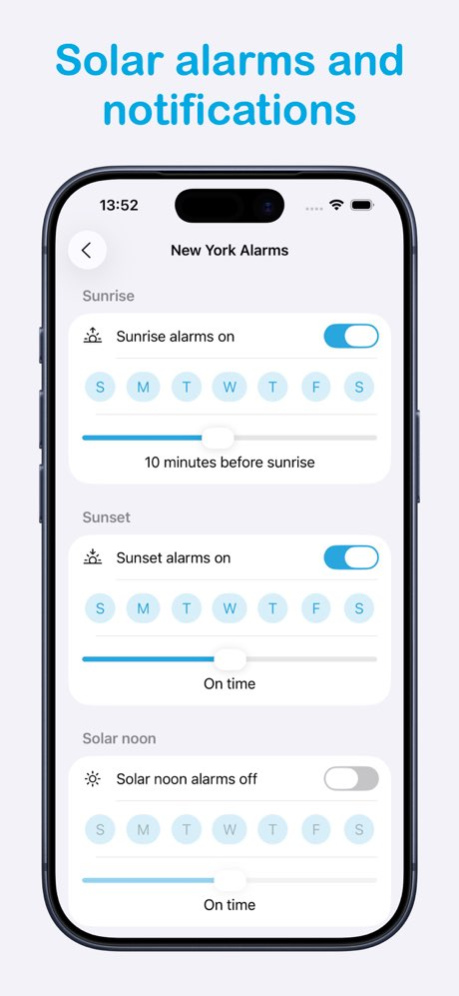
- Set customizable alarms for sunrise and sunset
- Configure alarms to trigger up to 120 minutes before or after sunrise and sunset
- Select specific days of the week for alarms to trigger
- Advanced alarm settings like snooze and countdown
Smart Notifications
- Set customizable alerts for sunrise and sunset
- Configure notifications up to 120 minutes before or after sunrise and sunset
- Select specific days of the week for notifications to trigger
- Maximize sunshine and never miss the perfect lighting conditions again
Beautiful Home Screen Widgets
- 6 different widget styles to choose from showing sunrise, sunset, and other solar data
- Display your most important sun data at a glance
Interactive Sun Angle Map
- Track the sun’s position on a map
- View what direction the sun is coming from when the sun rises and sets
- Follow the path of the sun throughout the day
- Explore the direction of the sun for any time, date, or location
- Watch how the sun patterns change throughout the year
Comprehensive Sun Information
- Precise sunrise and sunset times for any location
- Total daylight hours and daily daylight change
- Solar noon times
- Astronomical, nautical, and civil twilight times
- Golden hour and blue hour times
- Detailed day-by-day sun information
- Solstice information, including summer solstice dates and winter solstice dates
Location Management
- Automatic GPS location detection
- Search for any location worldwide
- Save and organize favorite locations
- Quick switching between multiple saved locations
- Choose locations for your widgets
Personalization Options
- Choose between light and dark modes
- Select custom color themes to match your style
- Configure which sun metrics appear on your home screen
- Customize date and time formats to your preference
User-Friendly Design
- Intuitive, easy-to-navigate interface
- Clean, distraction-free presentation of information
- Fast loading times and minimal battery usage
- No account creation required
Family Sharing
- Share your Hey Sunrise Premium membership with the rest of your household members!
Hey Sunrise is the perfect companion for photographers seeking the perfect light, outdoor enthusiasts planning activities around daylight hours, or anyone who wants to stay connected with nature's rhythm.
Whether you're capturing stunning sunrise photos, planning outdoor adventures around daylight hours before sunset, or simply want to know when to expect darkness, Hey Sunrise provides all the solar information you need in one beautiful, easy-to-use app, ad-free app.
Download Hey Sunrise today and never miss a perfect sunrise or sunset again!
Version History Minor bug fixes and improvements 5.20.0 Aug 13 Minor bug fixes and improvements 5.19.0 Jul 25 Added moon info in day screen 5.18.1 Jun 16 Bug fixes 5.18.0 Feb 4 - Added altitude and azimuth to map screen
- Save location coordinates from map screen
- Bug fixes 5.17.0 Feb 3 - More lock screen widgets
- Bug fixes 5.16.0 Feb 2 - More lock screen widgets
- Bug fixes 5.15.0 Feb 1 New lock screen widgets 5.14.0 Jan 30 Minor bug fixes and improvements 5.13.0 Jan 29 New next sunrise/sunset widget 5.12.0 Jan 27 Minor bug fixes and improvements 5.11.0 Jan 25 Added haptic support 5.10.0 Jan 19 Minor bug fixes and improvements 5.9.0 Jan 15 Minor bug fixes and improvements 5.8.0 Jan 11 Minor bug fixes and improvements 5.7.0 Jan 8 * Localization improvements
* Bug fixes and improvements 5.6.0 Jan 6 Various iPad improvements
Improved alarm sound settings 5.5.0 12/29/2025 - Choose alarm sounds. Access in settings.
- New option to show location coordinates. Turn on in settings. 5.4.0 11/19/2025 * Improved iPad experience
* New default location indicator in times list screen to indicate when default location is being used
* Moved previous and next day buttons to bottom of screen in time detail screen 5.3.0 11/16/2025 New onboarding flow for new users. Existing users can access via the settings screen if interested. 5.2.0 11/13/2025 Minor improvements to alarms 5.1.0 11/04/2025 NEW: Schedule recurring alarms based on sunrise and sunset 5.0.0 11/03/2025 - Updated app icon. Choose your icon in settings.
- Request a feature from settings screen 4.15.0 08/15/2025 - Include event time in notification text
- Improved notification localization 4.13.0 08/14/2025 - Schedule solar noon notifications
- New buttons in detail view for switching between next and previous days 4.12.0 07/30/2025
About Sunrise Sunset: Times & Alarms
The company that develops Sunrise Sunset: Times & Alarms is Daniel McAleese. The latest version released by its developer is 5.20.0.
To install Sunrise Sunset: Times & Alarms on your iOS device, just click the green Continue To App button above to start the installation process. The app is listed on our website since 2026-10-07 and was downloaded 4 times. We have already checked if the download link is safe, however for your own protection we recommend that you scan the downloaded app with your antivirus. Your antivirus may detect the Sunrise Sunset: Times & Alarms as malware if the download link is broken.
How to install Sunrise Sunset: Times & Alarms on your iOS device:
- Click on the Continue To App button on our website. This will redirect you to the App Store.
- Once the Sunrise Sunset: Times & Alarms is shown in the iTunes listing of your iOS device, you can start its download and installation. Tap on the GET button to the right of the app to start downloading it.
- If you are not logged-in the iOS appstore app, you'll be prompted for your your Apple ID and/or password.
- After Sunrise Sunset: Times & Alarms is downloaded, you'll see an INSTALL button to the right. Tap on it to start the actual installation of the iOS app.
- Once installation is finished you can tap on the OPEN button to start it. Its icon will also be added to your device home screen.
Program Details
System requirements
Download information
Pricing
Version History
version 5.20.0
posted on 2026-10-07
Version History Minor bug fixes and improvements 5.20.0 Aug 13 Minor bug fixes and improvements 5.19.0 Jul 25 Added moon info in day screen 5.18.1 Jun 16 Bug fixes 5.18.0 Feb 4 - Added altitude and azimuth to map screen
- Save location coordinates from map screen
- Bug fixes 5.17.0 Feb 3 - More lock screen widgets
- Bug fixes 5.16.0 Feb 2 - More lock screen widgets
- Bug fixes 5.15.0 Feb 1 New lock screen widgets 5.14.0 Jan 30 Minor bug fixes and improvements 5.13.0 Jan 29 New next sunrise/sunset widget 5.12.0 Jan 27 Minor bug fixes and improvements 5.11.0 Jan 25 Added haptic support 5.10.0 Jan 19 Minor bug fixes and improvements 5.9.0 Jan 15 Minor bug fixes and improvements 5.8.0 Jan 11 Minor bug fixes and improvements 5.7.0 Jan 8 * Localization improvements
* Bug fixes and improvements 5.6.0 Jan 6 Various iPad improvements
Improved alarm sound settings 5.5.0 12/29/2025 - Choose alarm sounds. Access in settings.
- New option to show location coordinates. Turn on in settings. 5.4.0 11/19/2025 * Improved iPad experience
* New default location indicator in times list screen to indicate when default location is being used
* Moved previous and next day buttons to bottom of screen in time detail screen 5.3.0 11/16/2025 New onboarding flow for new users. Existing users can access via the settings screen if interested. 5.2.0 11/13/2025 Minor improvements to alarms 5.1.0 11/04/2025 NEW: Schedule recurring alarms based on sunrise and sunset 5.0.0 11/03/2025 - Updated app icon. Choose your icon in settings.
- Request a feature from settings screen 4.15.0 08/15/2025 - Include event time in notification text
- Improved notification localization 4.13.0 08/14/2025 - Schedule solar noon notifications
- New buttons in detail view for switching between next and previous days 4.12.0 07/30/2025
version 5.19.0
posted on 2026-08-12
Version History Minor bug fixes and improvements 5.19.0 Jul 25 Added moon info in day screen 5.18.1 Jun 16 Bug fixes 5.18.0 Feb 4 - Added altitude and azimuth to map screen
- Save location coordinates from map screen
- Bug fixes 5.17.0 Feb 3 - More lock screen widgets
- Bug fixes 5.16.0 Feb 2 - More lock screen widgets
- Bug fixes 5.15.0 Feb 1 New lock screen widgets 5.14.0 Jan 30 Minor bug fixes and improvements 5.13.0 Jan 29 New next sunrise/sunset widget 5.12.0 Jan 27 Minor bug fixes and improvements 5.11.0 Jan 25 Added haptic support 5.10.0 Jan 19 Minor bug fixes and improvements 5.9.0 Jan 15 Minor bug fixes and improvements 5.8.0 Jan 11 Minor bug fixes and improvements 5.7.0 Jan 8 * Localization improvements
* Bug fixes and improvements 5.6.0 Jan 6 Various iPad improvements
Improved alarm sound settings 5.5.0 12/29/2025 - Choose alarm sounds. Access in settings.
- New option to show location coordinates. Turn on in settings. 5.4.0 11/19/2025 * Improved iPad experience
* New default location indicator in times list screen to indicate when default location is being used
* Moved previous and next day buttons to bottom of screen in time detail screen 5.3.0 11/16/2025 New onboarding flow for new users. Existing users can access via the settings screen if interested. 5.2.0 11/13/2025 Minor improvements to alarms 5.1.0 11/04/2025 NEW: Schedule recurring alarms based on sunrise and sunset 5.0.0 11/03/2025 - Updated app icon. Choose your icon in settings.
- Request a feature from settings screen 4.15.0 08/15/2025 - Include event time in notification text
- Improved notification localization 4.13.0 08/14/2025 - Schedule solar noon notifications
- New buttons in detail view for switching between next and previous days 4.12.0 07/30/2025 Added new setting to display times using device time zone. Turn on from settings screen. 4.11.0 07/09/2025
version 5.18.1
posted on 2026-07-23
Version History Added moon info in day screen 5.18.1 Jun 16 Bug fixes 5.18.0 Feb 4 - Added altitude and azimuth to map screen
- Save location coordinates from map screen
- Bug fixes 5.17.0 Feb 3 - More lock screen widgets
- Bug fixes 5.16.0 Feb 2 - More lock screen widgets
- Bug fixes 5.15.0 Feb 1 New lock screen widgets 5.14.0 Jan 30 Minor bug fixes and improvements 5.13.0 Jan 29 New next sunrise/sunset widget 5.12.0 Jan 27 Minor bug fixes and improvements 5.11.0 Jan 25 Added haptic support 5.10.0 Jan 19 Minor bug fixes and improvements 5.9.0 Jan 15 Minor bug fixes and improvements 5.8.0 Jan 11 Minor bug fixes and improvements 5.7.0 Jan 8 * Localization improvements
* Bug fixes and improvements 5.6.0 Jan 6 Various iPad improvements
Improved alarm sound settings 5.5.0 12/29/2025 - Choose alarm sounds. Access in settings.
- New option to show location coordinates. Turn on in settings. 5.4.0 11/19/2025 * Improved iPad experience
* New default location indicator in times list screen to indicate when default location is being used
* Moved previous and next day buttons to bottom of screen in time detail screen 5.3.0 11/16/2025 New onboarding flow for new users. Existing users can access via the settings screen if interested. 5.2.0 11/13/2025 Minor improvements to alarms 5.1.0 11/04/2025 NEW: Schedule recurring alarms based on sunrise and sunset 5.0.0 11/03/2025 - Updated app icon. Choose your icon in settings.
- Request a feature from settings screen 4.15.0 08/15/2025 - Include event time in notification text
- Improved notification localization 4.13.0 08/14/2025 - Schedule solar noon notifications
- New buttons in detail view for switching between next and previous days 4.12.0 07/30/2025 Added new setting to display times using device time zone. Turn on from settings screen. 4.11.0 07/09/2025 Added language support for Polish and Greek 4.10.0 07/08/2025
version 5.18.1
posted on 2026-06-20
Version History Added moon info in day screen 5.18.1 4d ago Bug fixes 5.18.0 Feb 4 - Added altitude and azimuth to map screen
- Save location coordinates from map screen
- Bug fixes 5.17.0 Feb 3 - More lock screen widgets
- Bug fixes 5.16.0 Feb 2 - More lock screen widgets
- Bug fixes 5.15.0 Feb 1 New lock screen widgets 5.14.0 Jan 30 Minor bug fixes and improvements 5.13.0 Jan 29 New next sunrise/sunset widget 5.12.0 Jan 27 Minor bug fixes and improvements 5.11.0 Jan 25 Added haptic support 5.10.0 Jan 19 Minor bug fixes and improvements 5.9.0 Jan 15 Minor bug fixes and improvements 5.8.0 Jan 11 Minor bug fixes and improvements 5.7.0 Jan 8 * Localization improvements
* Bug fixes and improvements 5.6.0 Jan 6 Various iPad improvements
Improved alarm sound settings 5.5.0 12/29/2025 - Choose alarm sounds. Access in settings.
- New option to show location coordinates. Turn on in settings. 5.4.0 11/19/2025 * Improved iPad experience
* New default location indicator in times list screen to indicate when default location is being used
* Moved previous and next day buttons to bottom of screen in time detail screen 5.3.0 11/16/2025 New onboarding flow for new users. Existing users can access via the settings screen if interested. 5.2.0 11/13/2025 Minor improvements to alarms 5.1.0 11/04/2025 NEW: Schedule recurring alarms based on sunrise and sunset 5.0.0 11/03/2025 - Updated app icon. Choose your icon in settings.
- Request a feature from settings screen 4.15.0 08/15/2025 - Include event time in notification text
- Improved notification localization 4.13.0 08/14/2025 - Schedule solar noon notifications
- New buttons in detail view for switching between next and previous days 4.12.0 07/30/2025 Added new setting to display times using device time zone. Turn on from settings screen. 4.11.0 07/09/2025 Added language support for Polish and Greek 4.10.0 07/08/2025
version 5.18.0
posted on 2026-05-17
Version History Bug fixes 5.18.0 Feb 4 - Added altitude and azimuth to map screen
- Save location coordinates from map screen
- Bug fixes 5.17.0 Feb 3 - More lock screen widgets
- Bug fixes 5.16.0 Feb 2 - More lock screen widgets
- Bug fixes 5.15.0 Feb 1 New lock screen widgets 5.14.0 Jan 30 Minor bug fixes and improvements 5.13.0 Jan 29 New next sunrise/sunset widget 5.12.0 Jan 27 Minor bug fixes and improvements 5.11.0 Jan 25 Added haptic support 5.10.0 Jan 19 Minor bug fixes and improvements 5.9.0 Jan 15 Minor bug fixes and improvements 5.8.0 Jan 11 Minor bug fixes and improvements 5.7.0 Jan 8 * Localization improvements
* Bug fixes and improvements 5.6.0 Jan 6 Various iPad improvements
Improved alarm sound settings 5.5.0 12/29/2025 - Choose alarm sounds. Access in settings.
- New option to show location coordinates. Turn on in settings. 5.4.0 11/19/2025 * Improved iPad experience
* New default location indicator in times list screen to indicate when default location is being used
* Moved previous and next day buttons to bottom of screen in time detail screen 5.3.0 11/16/2025 New onboarding flow for new users. Existing users can access via the settings screen if interested. 5.2.0 11/13/2025 Minor improvements to alarms 5.1.0 11/04/2025 NEW: Schedule recurring alarms based on sunrise and sunset 5.0.0 11/03/2025 - Updated app icon. Choose your icon in settings.
- Request a feature from settings screen 4.15.0 08/15/2025 - Include event time in notification text
- Improved notification localization 4.13.0 08/14/2025 - Schedule solar noon notifications
- New buttons in detail view for switching between next and previous days 4.12.0 07/30/2025 Added new setting to display times using device time zone. Turn on from settings screen. 4.11.0 07/09/2025 Added language support for Polish and Greek 4.10.0 07/08/2025 New auto fetch GPS setting. Turn on in settings screen. 4.9.0 07/07/2025
version 5.18.0
posted on 2026-02-04
Bug fixes
version 4.15.0
posted on 2025-08-15
Aug 15, 2025
Version 4.15.0
- Updated app icon. Choose your icon in settings.
- Request a feature from settings screen
version 4.11.0
posted on 2025-07-09
Jul 9, 2025
Version 4.11.0
Added new setting to display times using device time zone. Turn on from settings screen.
version 4.7.0
posted on 2025-04-25
Apr 25, 2025
Version 4.7.0
Language support for Indonesian and Turkish
version 4.5.0
posted on 2025-04-18
Apr 18, 2025
Version 4.5.0
Added what’s new banner
